Share Absence with Legal Guardians and Pupils
Introduction
To provide more transparency and better communication, you can share absences with legal guardians and pupils.
This means that the absence becomes visible to the legal guardians and pupils.
Sharing an absence is optional and can be individually configured by the school.
Legal guardians and pupils can only view the absences and cannot edit them.
Share Absence
To share absences with legal guardians and pupils, proceed as follows:
Sharing of absences can only be enabled by an administrator.
- Navigate to the Settings module.
- Select the Absences tab.
- Click Edit in the top right.
- Enable sharing.
- Finally, click Save.
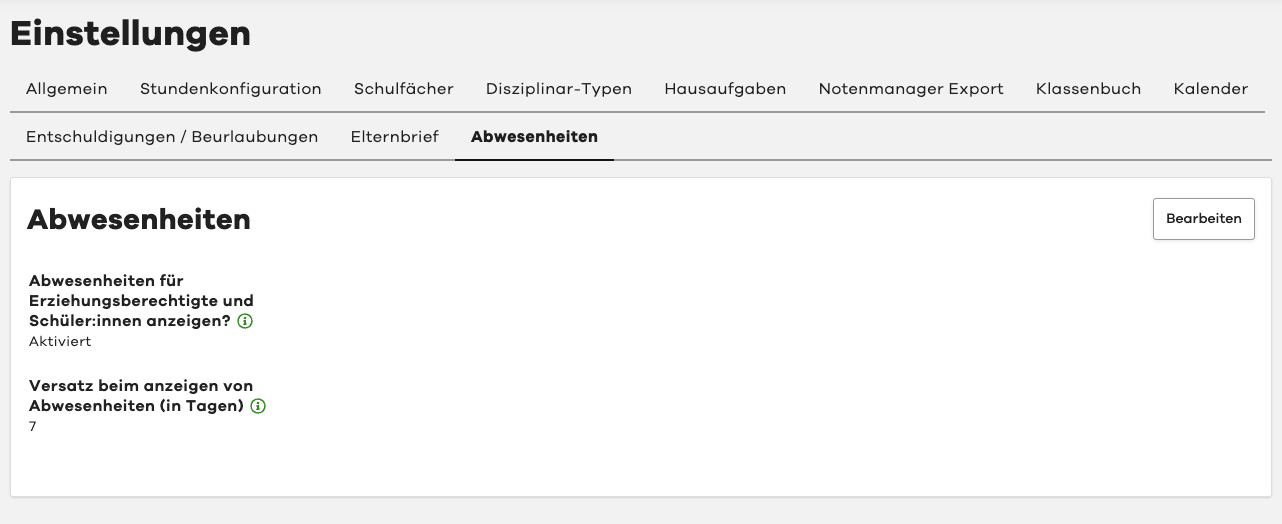
Absences are now visible to legal guardians and pupils.
Delay for Displaying Absences
Optionally, you can set a delay in days for the visibility of absences.
This means that absences only become visible to legal guardians and pupils after a certain number of days.
This allows you, for example, to add absences retroactively.
The configured delay is displayed to legal guardians and pupils.